A loan ad that says “rates start at 5.99%” is describing the lowest rate a lender may offer—not a rate every borrower should expect to receive. The advertised figure usually applies only to qualified applicants who meet the lender’s standards for credit, income, time in business, collateral, and other factors. The final offer depends on the application and lender approval.
That distinction matters if you’re comparing financing for a small business—or deciding whether the business can afford to hire. A low advertised rate can be a useful starting point, but it doesn’t tell you the full cost of borrowing, the monthly payment, or whether the money will support a sustainable payroll budget.
Here’s how to read a 5.99% starting rate, what to check before applying, and how free small business calculators can help you compare financing with the real cost of hiring and paying employees.
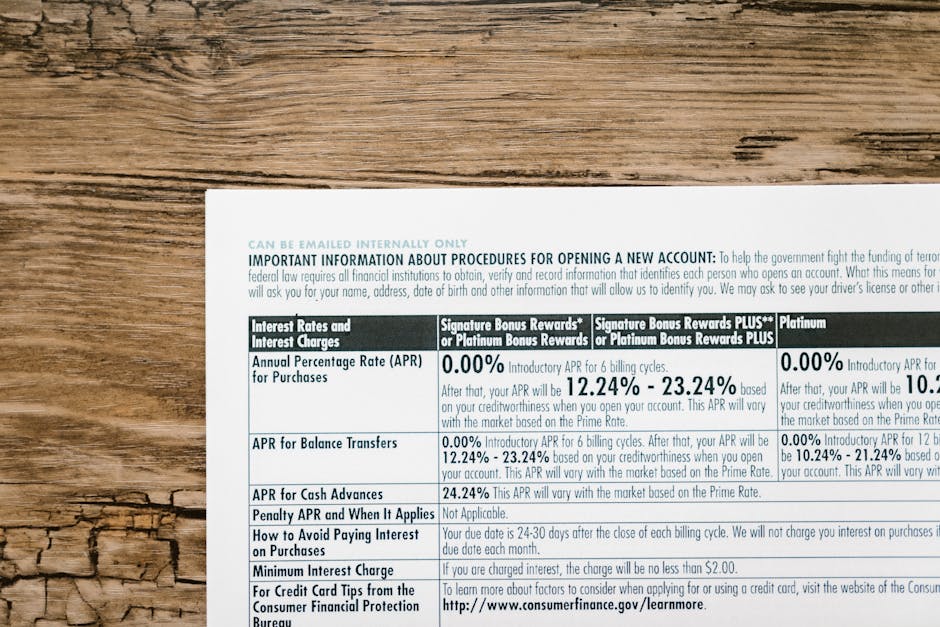

What “rates start at 5.99%” actually means
“Starting at” signals a minimum, not a typical or guaranteed rate. The lender may reserve that rate for applicants with strong credit and financial profiles. Other applicants may be offered a higher rate, a smaller loan, a different repayment term, or no loan at all.
For a business loan, lenders may look at factors such as:
- Personal and business credit history Annual revenue and cash flow Time in business Existing debt and payment obligations Loan amount, term, and intended use Collateral, personal guarantees, or other security
Requirements vary by lender and loan product. A business owner with excellent credit may still receive a higher offer if the business has uneven revenue or significant existing debt. Conversely, a borrower’s situation may fit one lender’s requirements better than another’s. The advertised rate is not enough information to predict your offer.
Check whether the ad shows an interest rate or an APR
A quoted interest rate describes the cost of borrowing the principal, but it may not include every required borrowing cost. The annual percentage rate (APR) is designed to express the yearly cost of credit and can include certain fees, depending on the product and applicable rules. It can make comparisons easier, but you should still read the loan agreement and ask how the lender calculates it.
Before comparing two offers, look for these details:
- Fixed or variable rate: A fixed rate generally stays the same for the agreed period. A variable rate can change according to its index and terms. Origination and other fees: Ask about application, underwriting, packaging, closing, servicing, and late-payment fees. A fee can reduce the amount deposited into your account. Repayment frequency: Payments might be monthly, weekly, or on another schedule. Frequent payments can put more pressure on cash flow than the headline rate suggests. Loan term: A longer term may lower each scheduled payment while increasing the total interest paid. Prepayment terms: Check whether paying early saves interest or triggers a fee. Collateral and guarantees: Understand what assets—or whose personal finances—could be at risk if the business cannot repay.
A quick payment sanity check
Suppose a business borrows $50,000 at a fixed 5.99% annual interest rate for five years, with monthly payments and no fees. A standard amortization estimate puts the payment at roughly $967 a month, with total payments of about $58,000 over the term. The exact figure depends on the lender’s calculation and payment dates.
That back-of-the-napkin check is useful for spotting whether a quote seems plausible. It is not a substitute for the lender’s repayment schedule. If fees are added or financed, the actual amount borrowed and total cost may be higher. If the loan is variable-rate or uses a different payment structure, the estimate may not apply.
Why your offer may be higher than 5.99%
The lender is pricing both the cost of funds and the risk it sees in your application. A lender may consider a lower rate appropriate for an applicant with strong credit, reliable cash flow, and a solid repayment history. An applicant with limited credit history, inconsistent revenue, or a shorter business track record may be offered a higher rate because the lender sees more uncertainty.
Loan type also matters. A term loan, line of credit, equipment loan, and merchant cash advance are different products, with different payment structures and costs. A headline rate for one product may not be directly comparable to a quoted factor rate or fee-based cost for another. Ask for the total amount you will repay in dollars, the payment schedule, and the APR where applicable.
Be cautious if an ad emphasizes a very low rate but makes the loan type, fees, eligibility rules, or repayment frequency hard to find. A legitimate offer should let you review the material terms before you commit. Don’t treat “prequalified” or “preapproved” as a guarantee: those terms can refer to an early assessment that still depends on verification and final underwriting.
Use calculators to compare borrowing with hiring costs
A loan can help a business manage a planned expense, but it doesn’t make that expense affordable by itself. If you’re borrowing to hire, compare the scheduled loan payment with the full cost of adding an employee—and with the business’s cash flow during slower months.
Free small business calculators can help organize the numbers. QuickBooks offers business and payroll-related resources that may help with estimates, while Gusto provides payroll and paycheck resources. Calculator features and assumptions can change, so confirm what a tool includes and check its current terms. Treat online estimates as planning aids, not legal, tax, lending, or payroll determinations.
For a useful comparison, estimate:
- The loan’s monthly payment and total repayment amount The employee’s gross wages or salary Employer payroll taxes and any required state or local contributions Benefits, workers’ compensation, and paid leave costs Recruiting, onboarding, equipment, and training expenses Expected revenue or capacity the hire is meant to support
The true cost of hiring is more than the amount printed in the job offer. Employer costs vary with pay, benefits, location, worker classification, and the business’s insurance and tax situation. State and local rules also differ, including rules that affect minimum pay, paid leave, payroll taxes, and workers’ compensation. Check the requirements where the employee works, not just where the company is based.
Example: comparing a hire with a loan payment
Imagine a business is considering a full-time employee at $50,000 a year. That is about $4,167 in gross wages per month before employer costs. If americanbusinesscenter.org the business’s rough planning estimate adds 20% for payroll taxes, benefits, insurance, and other employment costs, the monthly cost would be about $5,000. That 20% is only an example—not a universal rule. The actual cost could be lower or higher depending on the employee’s benefits, work location, and coverage.
If the business also takes the illustrative $50,000 loan above, it must plan for about $967 in monthly loan payments in addition to the cost of the employee. The hire should make business sense without relying on the ad’s lowest possible rate or assuming the new employee will generate immediate revenue.
Estimate employee turnover cost with simple math
Turnover can make a hiring plan more expensive than it looks. When an employee leaves, the business may face recruiting time, job-ad costs, onboarding, training, lost productivity, and temporary coverage. The costs vary widely by role. Replacing an hourly position may involve different expenses from replacing a specialized or senior employee.
One practical way to estimate turnover cost is to list the direct and indirect costs instead of applying a generic percentage to salary:
Recruiting: Add job ads, recruiter fees, staff time spent screening, and interview time. Vacancy and coverage: Estimate overtime, temporary help, or revenue lost while the position is open. Onboarding: Include paperwork, equipment, required training, and supervisor time. Ramp-up: Estimate the period when the new employee is still learning and may not be working at full productivity.For a simple example, suppose recruiting costs $1,200, coverage during a vacancy costs $2,000, and onboarding plus training costs $1,800. The direct estimate is $5,000 before accounting for lost productivity. If the employee leaves and the business repeats the process, that expense can be meaningful—especially for a small team. Use your own records where possible; an industry average may not reflect your role or location.
A calculator or spreadsheet can help you test different assumptions. For example, compare the cost of one replacement with the loan payment and the employee’s monthly employment cost. The point is not to predict turnover perfectly. It is to make the risk visible before committing to financing or expanding payroll.
Paycheck estimates are not the same as take-home pay
When budgeting for an employee, distinguish between gross pay, employer cost, and employee take-home pay. Gross pay is the amount earned before deductions. Take-home pay is what the employee receives after applicable withholding and deductions. Employer payroll taxes and benefits are additional business costs; they are not all taken out of the employee’s paycheck.
A paycheck estimate may depend on:
- Pay rate, hours worked, and pay frequency Federal income tax withholding elections State and local income taxes, where applicable Social Security and Medicare withholding Health insurance, retirement contributions, and other deductions State-specific rules and the employee’s work location
For example, two employees with the same gross salary can receive different take-home pay because they have different withholding elections or benefit deductions. A calculator can provide an estimate, but it cannot know every payroll setup detail unless you enter accurate information. Use a paycheck estimate for planning, then rely on correctly configured payroll records and current tax guidance for actual paychecks.
For employers, payroll tools such as Gusto or QuickBooks Payroll may help manage payroll workflows, but software does not remove the need to set up tax accounts, classify workers correctly, follow state and local requirements, and review payroll data. Confirm the product’s current features, service fees, and supported jurisdictions before choosing a provider. Pricing and plan inclusions can change.
A short checklist before you act on a 5.99% ad
- Ask whether 5.99% is an interest rate or APR, and whether it is fixed or variable. Request the rate you qualify for after review—not just the advertised minimum. Get the payment schedule, total repayment amount, and all fees in writing. Compare offers for the same loan amount and term. Run a payment estimate, then verify it against the lender’s disclosure. If the loan supports hiring, budget for wages, employer costs, turnover, and cash-flow variability. Check payroll and employment requirements in every state where employees work.
The bottom line
A “5.99% starting rate” is a best-case advertised figure, not a promise. Your rate and terms depend on the loan and your application, and final funding depends on lender approval. The right comparison is not just the headline percentage; it is the total cost, payment schedule, fees, and risk.
If you’re considering a loan to hire, use free small business calculators as a first pass, then sanity-check the results with your own numbers. Estimate the full cost of employment, account for possible turnover, and distinguish employer expenses from employee take-home pay. QuickBooks and Gusto resources can help with planning, but confirm their current capabilities and don’t substitute a calculator estimate for a lender’s final terms or a compliant payroll setup.